Loading

PixelCheck

Back to Work

PixelCheck

Holding AI-built UI to the designer's frames, at every screen size.
Industry AI Tooling / Design QA
Role Designer & builder (with Claude Code)
Year Sep – Oct 2026
Platform Web
Tools Nebius Token Factory, NVIDIA Nemotron 3 Super, Gemma 3 27B, Playwright, Python + FastAPI, React + TypeScript, Tailwind CSS, Claude Code
Problem
AI builders turn a design into a page in minutes, but it drifts on phones, and the usual checks only ask whether the page breaks.
My role
Designer & builder, solo, with Claude Code as coding partner.
Outcome
A real AI build of FitStart fit at all 8 widths yet scored 38 on phone; PixelCheck showed why and wrote a fix brief.
Timeline
Sep – Oct 2026
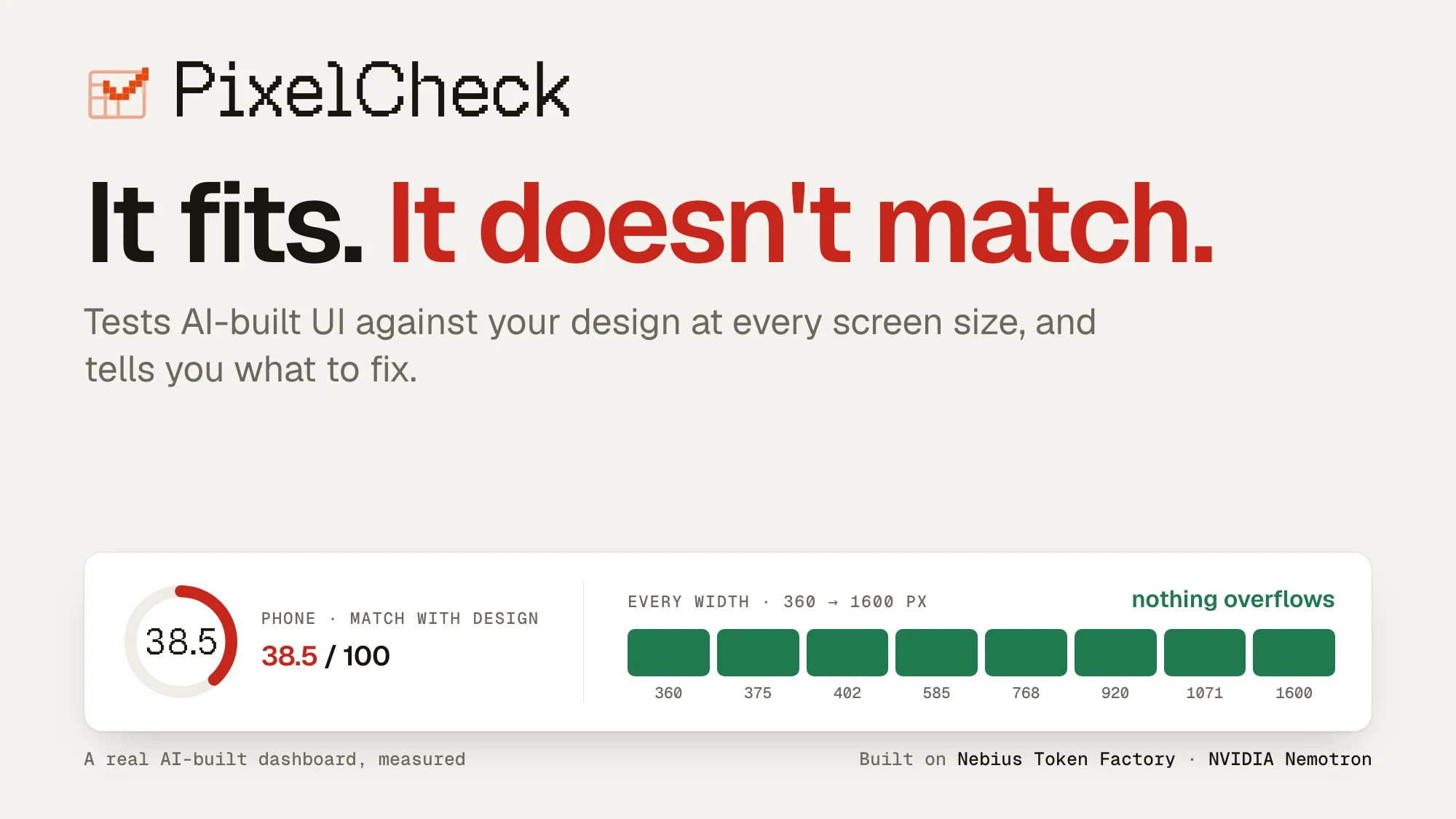
PixelCheck case study hero image - Holding AI-built UI to the designer's frames, at every screen size.
38 Phone match score, while all 8 widths fit
7 Texts my own shipped app lost on phones
~1 min Per check, about 5 cents

Key Decisions

The worst size as the headline

  • An average across phone, tablet and desktop

Chosen: The worst size is the headline score

An average of 38, 61 and 65 would hide the phone, which is the whole problem.

Explain the score instead of tuning it

  • Changing the scorer after seeing a result

Chosen: Show points lost per factor and drift band by band beside the score

Spacing that drifts down the page costs points on every row below; explaining that keeps the score honest.

Trade-off Drift down the page still costs points on every row below it.

A verifier outside the model

  • Trusting the language model's fix brief as written

Chosen: Every line cites a measured fact, and a rule-based check drops what the facts don't back

The first briefs looked plausible but weren't safe to paste.

Score where the build can't see the answer

  • Scoring in the same environment that captures the build

Chosen: Score in a disposable sandbox with the network off, the only place the design frames go

The build never sees the design it is graded against, so it can't grade itself.

Try it

The real check is a recorded run and opens instantly. Live checks run on a free server that can take up to a minute to wake.

01 · The gap

It fits. It doesn't match.

AI builders like Lovable, v0 and Bolt turn a design into a working page in minutes, and it usually looks right on the laptop you check it on. On a phone it quietly drifts: smaller type, tighter spacing, the wrong font, a platform badge sitting on a button.

Designers already make phone, tablet and desktop frames. The checks we have ask whether a page breaks: does anything overflow or overlap? I wanted to ask a designer's question instead: is it still my design, at every size? PixelCheck treats the frames as the spec and measures the build against them.

Lovable's build of my FitStart dashboard

  1. 360 px: fits
  2. 375 px: fits
  3. 38.5 402 px, Phone design width: fits; scores 38.5 against the design
  4. 585 px: fits
  5. 61.1 768 px, Tablet design width: fits; scores 61.1 against the design
  6. 920 px: fits
  7. 64.5 1071 px, Desktop design width: fits; scores 64.5 against the design
  8. 1600 px: fits

All 8 widths fit. Nothing overflows or overlaps, from 360 to 1600 px.

Fig. 1. Both views are the same build. An overflow check stops at "fits"; PixelCheck also scores each design width against its frame.

02 · A real test

My own design, built by Lovable, measured

I gave Lovable my three FitStart dashboard frames and one prompt, and took its first output. It looked right on my laptop. PixelCheck scored it 38 on phone, 61 on tablet and 65 on desktop, while all 8 widths fit. On a phone, content sat 150 px higher than the design by the bottom of the screen, yet nothing overflowed, so an overflow check would pass it.
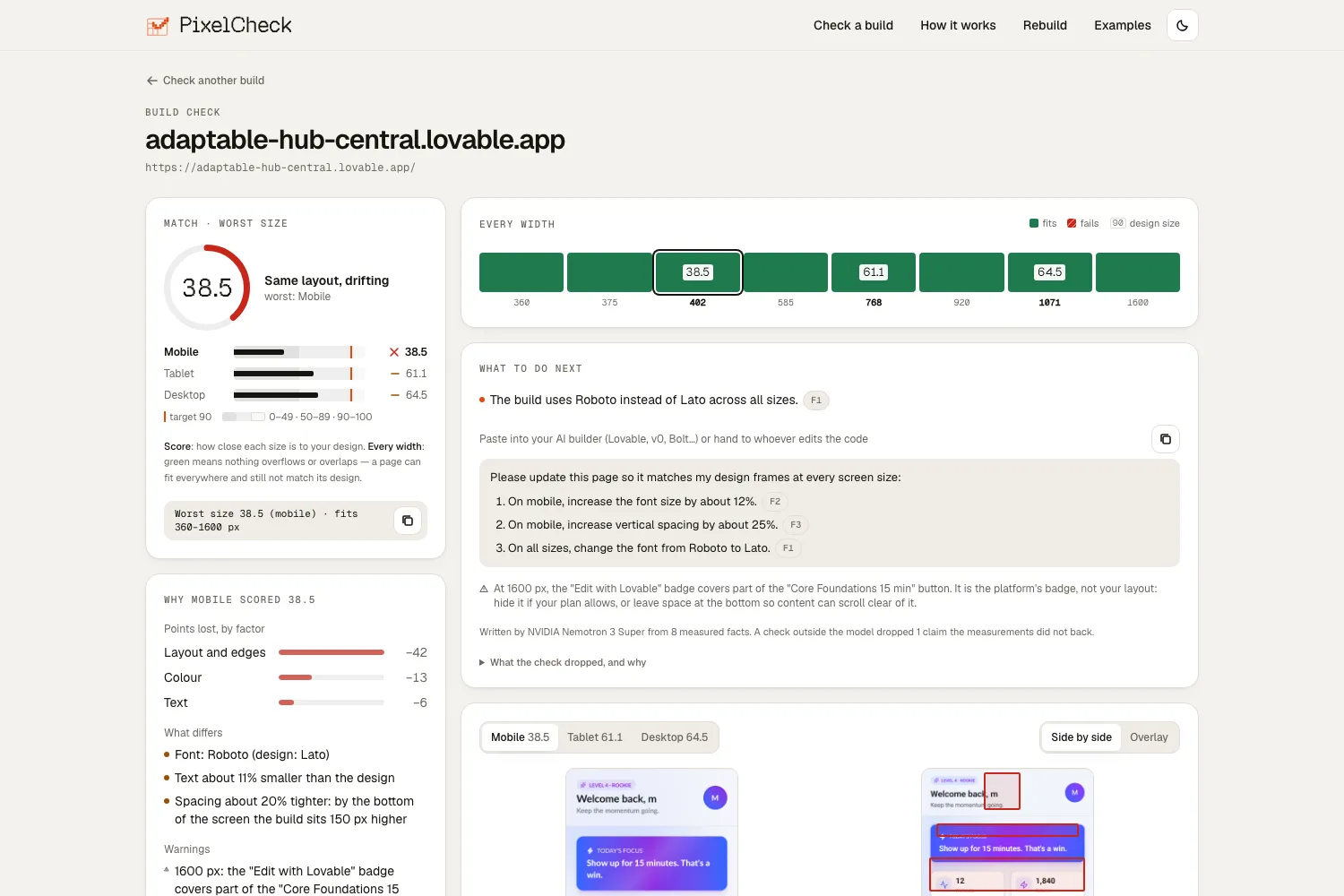
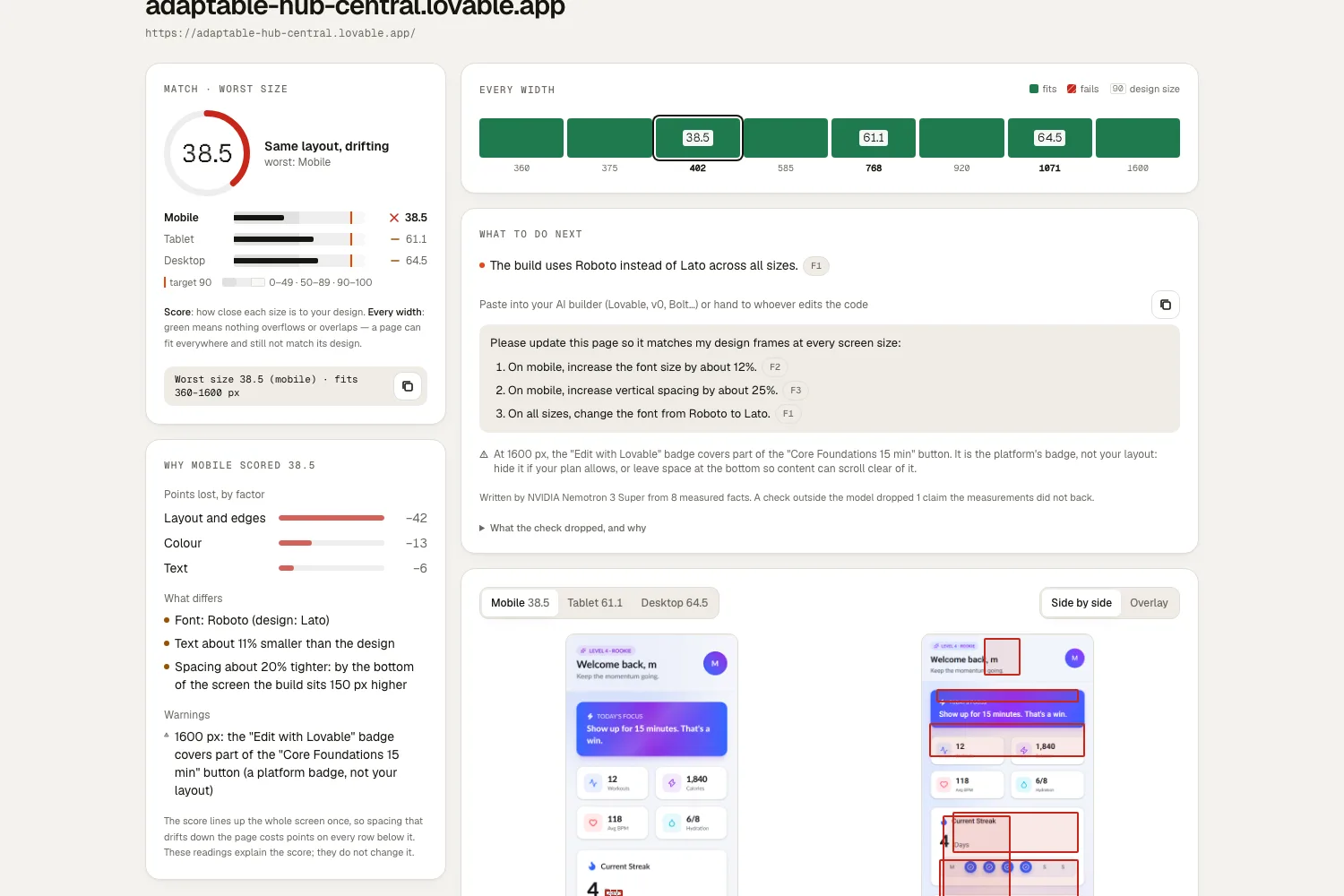
PixelCheck's result for the Lovable build: a ring showing 38.5 at the worst size (mobile), bars for mobile 38.5, tablet 61.1 and desktop 64.5 against a target of 90, an every-width strip with all 8 widths green, and a fix brief.
Fig. 2. The result page. The headline is the worst size, and the strip shows every width fitting.

One example, not a ranking of tools. The point is that the drift is invisible until something measures it.

03 · Designing the result

A score is only useful if it says why

The result page is the product, so I designed it the way I would any dashboard: what does someone need to decide, and in what order?

  • The worst size is the headline. An average of 38, 61 and 65 would hide the phone, which is the whole problem.
  • Fits and matches are kept apart. The green and red strip answers "does it break?" The score answers "is it the design?" A note on the card says a page can fit everywhere and still not match.
  • Explain the score; don't tune it. The scorer lines up the whole screen once, so spacing that drifts down the page costs points on every row below. Rather than change the score after seeing a result, the page shows points lost per factor and the drift band by band.
  • Verdicts in plain words. "Same layout, drifting" and "Text about 11% smaller" before any number a designer has to decode.

Why the phone size scored 38.5

Layout and edges
−42 points
Colour
−13 points
Text
−6 points

What differs

  • Font: Roboto, where the design uses Lato
  • Text 11–15% smaller than the design
  • Spacing about 20% tighter: by the bottom of the screen, content sits 150 px higher
The 'Why mobile scored 38.5' panel beside a side-by-side view of the design and the build, with red boxes marking text that moved and a drift reading from top to bottom of the screen.
Fig. 3. Why the phone scored 38.5: points lost per factor, what differs, and the design beside the build.

04 · A fix brief you can trust

The model writes; the measurements decide what stays

A score tells you something is wrong. A designer handing work back to an AI builder needs to say what to change. PixelCheck gives NVIDIA Nemotron 3 Super a list of numbered, measured facts, and it writes a short brief to paste into Lovable, v0 or Bolt. Every line has to cite a fact.

Then a rule-based verifier, outside the model, checks every line: numbers and units against the cited fact, quoted text, which screen size the instruction names, and words that overclaim a cause. Anything the measurements don't back is dropped, and the page says what it dropped and why.

I built the verifier because the first briefs looked plausible but weren't safe to paste. One said "move the badge"; another gave a mobile-only fix without naming a size.
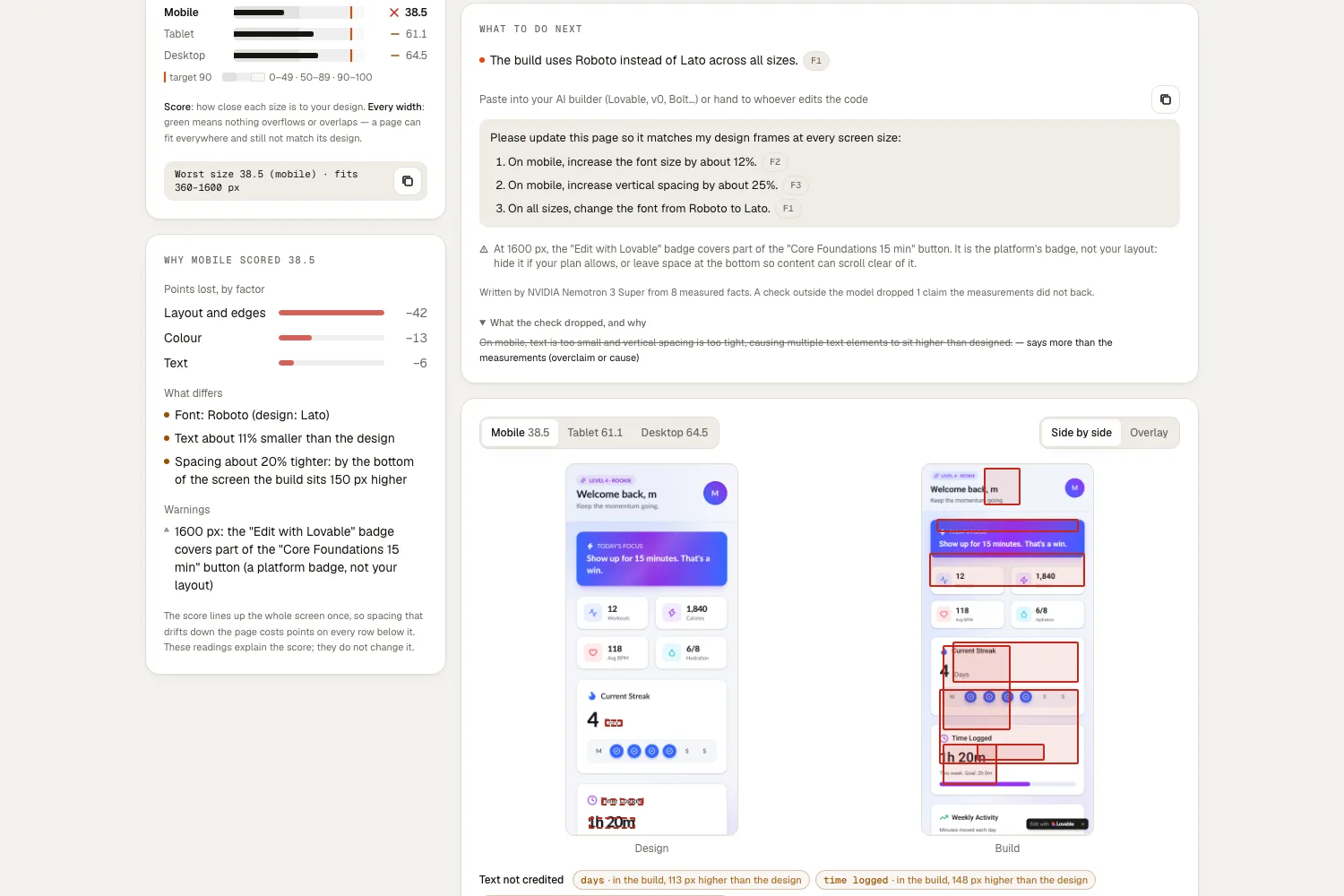
The 'What to do next' panel: a message to paste into an AI builder with three numbered instructions, each tagged with the fact it cites (F1, F2, F3), and a footer saying Nemotron 3 Super wrote it from 8 measured facts and a check outside the model dropped 1 claim.
Fig. 4. Each instruction carries the fact it rests on. In this check, the verifier dropped one claim.

05 · No designs? Audit

Pointing it at my own shipped apps

Not every page has frames to compare with, so PixelCheck also audits a URL on its own: whether it breaks at any width, whether a platform badge covers content, and what text a phone loses. I ran it on three of my own deployed apps: two from my AI Lab, and EqualTales.
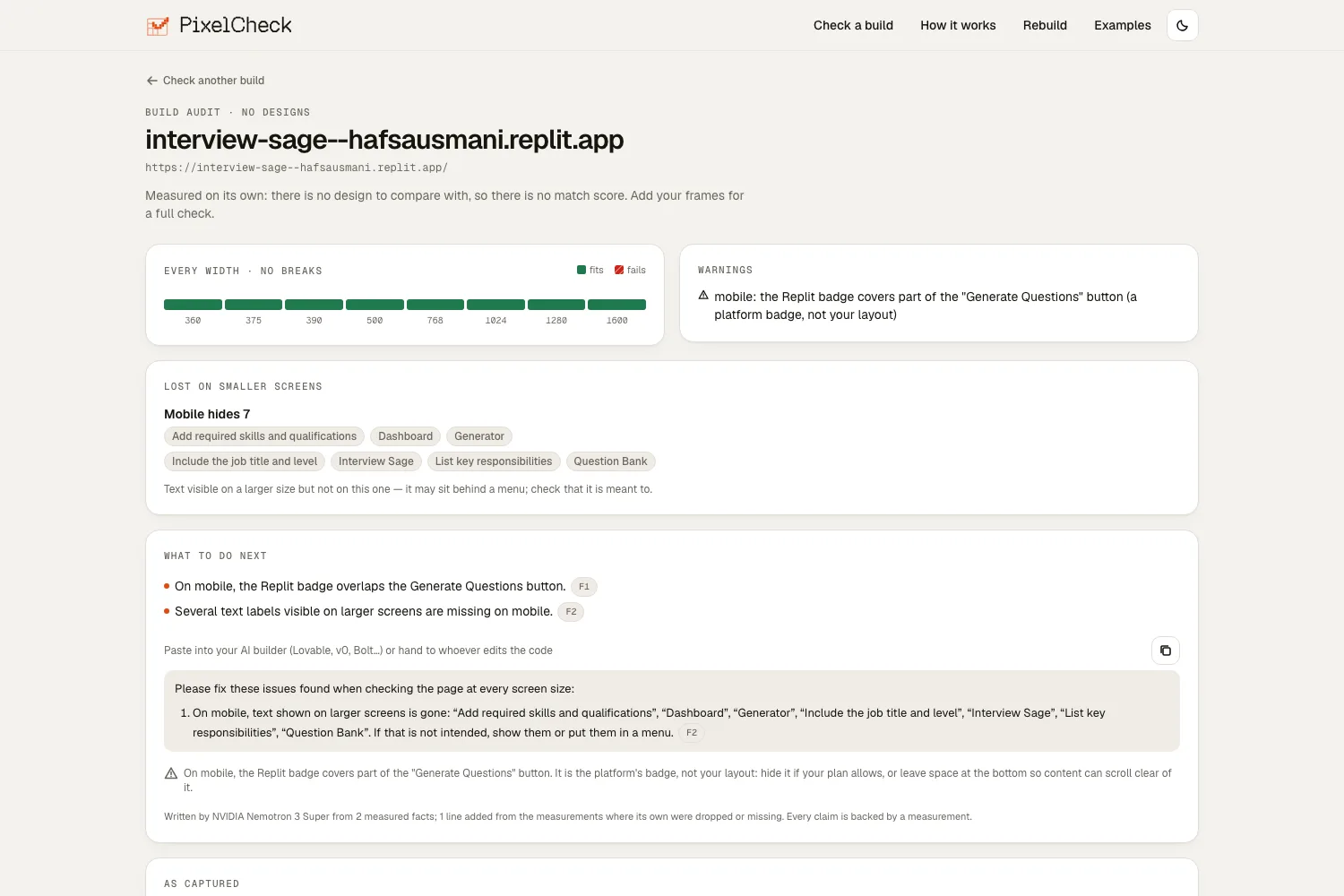
  • Interview Sage: 7 texts shown on larger screens are gone on phones, and the Replit badge covers part of the "Generate Questions" button.
  • HeadshotAI: the "Edit with Lovable" badge covers part of the upload button on phones.
  • EqualTales: nothing to fix.
An audit of Interview Sage with no designs: every width fits, a warning that the Replit badge covers part of the Generate Questions button on mobile, and a list of 7 texts hidden on mobile.
Fig. 5. An audit needs only a URL. It has no match score, because there is no design to compare with.

PixelCheck can also rebuild a page from its frames as one responsive React and Tailwind codebase, and score the rebuild with the same checks. Rebuilding the home page of this site scored 87.4 at its worst size, with the site and the rebuild both set in Inter for a like-for-like comparison.

06 · How it's built

Models read and write; code measures and decides

The split is deliberate. Language models do what they are good at: reading frames and turning facts into instructions. Everything that decides a score or a claim is measured and checked in code, inside an isolated sandbox.

  1. Frames Phone, tablet and desktop designs, as exported PNG · JPG · WebP
  2. Capture The build at each design width and 8 widths from 360 to 1600 px PlaywrightToken Factory Sandbox
  3. Read Every text and block, on the frames and the build Gemma 3 27BTesseract OCR
  4. Score Each size against its frame, with the network off Python scorerToken Factory Sandbox
  5. Brief A fix brief from numbered, measured facts NVIDIA Nemotron 3 Super
  6. Verify Drops any line the measurements do not back Rule-based verifier

Runs the checks

Nebius Token Factory Sandboxes Sandbox
Capture the build with the network on, then score it in a disposable copy with the network off. That copy is the only place the design frames go, so the build never sees its own answer.
Playwright + Chromium Library
Load the build at every width and capture it, with animations stopped and scrollbars hidden.
esbuild + Tailwind CSS Library
Render an uploaded App.jsx offline, inside the sandbox.

Reads and writes

Every model call runs on Nebius Token Factory.

Gemma 3 27B Model
Reads the design frames: what each text says and what it is for.
Tesseract OCR Library
Finds and places every line of text, so the check can say what moved and how far.
NVIDIA Nemotron 3 Super Model
Writes the fix brief from numbered facts, and must cite a fact for every line.
NVIDIA Nemotron 3 Ultra Model
Plans responsive layout when rebuilding from frames. Its plan is kept only if the sandbox shows it is no worse.

Measures

Scorer (Python) Code
Compares edges, layout blocks, colour and text at each size. The worst size is the headline.
Fix-brief verifier (Python) Code
Checks every number, quote, screen size and cause word against the cited facts, and drops what does not match.

The app

React + TypeScript + Vite Front end
The web app: checks, replays and results. Hosted on Vercel.
Tailwind CSS Styling
Styles the app, and is what rebuilt code is written in.
Python + FastAPI API
The API behind live checks and rebuilds. Hosted on Render.
Claude Code Partner
My coding partner for the build, as on this portfolio.

07 · Trying to fool my own scorer

If a build can game the score, the score means nothing

When PixelCheck rebuilds a page, a model writes code that my scorer then grades, and code written against a scorer finds its weak spots. So I attacked my own scorer first, with builds that copy text once per screen size, pin a layout to one exact width, or hide text to collect points, and hardened it over two rounds. A rebuild caught cheating scores zero.

I haven't found another tool that checks one build against phone, tablet and desktop frames at once. I don't claim to be the first to check AI-built UI visually.

Honest limits

  • Each frame is scored on its first screen; full-page scoring is not done yet.
  • Text reading is Latin-script only, and fonts come from 16 open families.
  • About a minute and about 5 cents is for the example, whose design reading is ready ahead of time. New frames take longer to read.
  • The Lovable build is one real example, not a benchmark.

What I learned

Measurements are what make a language model useful and safe here. Nemotron is good at turning numbered facts into instructions a builder can follow. A verifier outside the model is what makes those instructions trustworthy.

What's next

A command-line version, so an AI coding agent can check its own UI at every size before it says "done".